WiFi for your business
WiFi for your business, with quality and security guarantees for both customers and employees, as well as any other devices that may need internet connectivity through the WiFi network.
WiFi Network
A WiFi network system is an installation made up of elements whose primary function is to provide connectivity. In this way, an establishment can offer WiFi connection to customers, employees, or the establishment’s own devices, such as computers, POS terminals, TV screens, etc. A WiFi network system can consist of one or more Access Points (APs) as well as other components.
Site
A «site» is defined as a network installation with a hotspot that is managed and monitored independently. Examples of sites include: a restaurant, a hotel, a library, a waiting room, etc. Each site must have a WiFi.PRO Controller device that manages network connections and communicates with the Cloud platform to offer absolute control.
SSID (WiFi Network Name)
An SSID (Service Set Identifier) is the public name of a Wireless Local Area Network (WLAN). It serves to differentiate it from other wireless networks in the area.
End User
Hereafter, we define an «end user» as any person who connects to and uses the WiFi service through their devices: mobile phones, tablets, or computers.
Device
Any equipment or component that allows an internet connection: mobile phones, tablets, or computers. Additionally, the networks intended to provide connectivity may be composed of network devices: access points, switches, and others.
Captive Portal
To access the WiFi service, end users must go through a portal or landing page displayed on their mobile devices, tablets, or other equipment. This «Captive Portal» can be configured in different ways, according to the needs of each site, to facilitate the Login process.
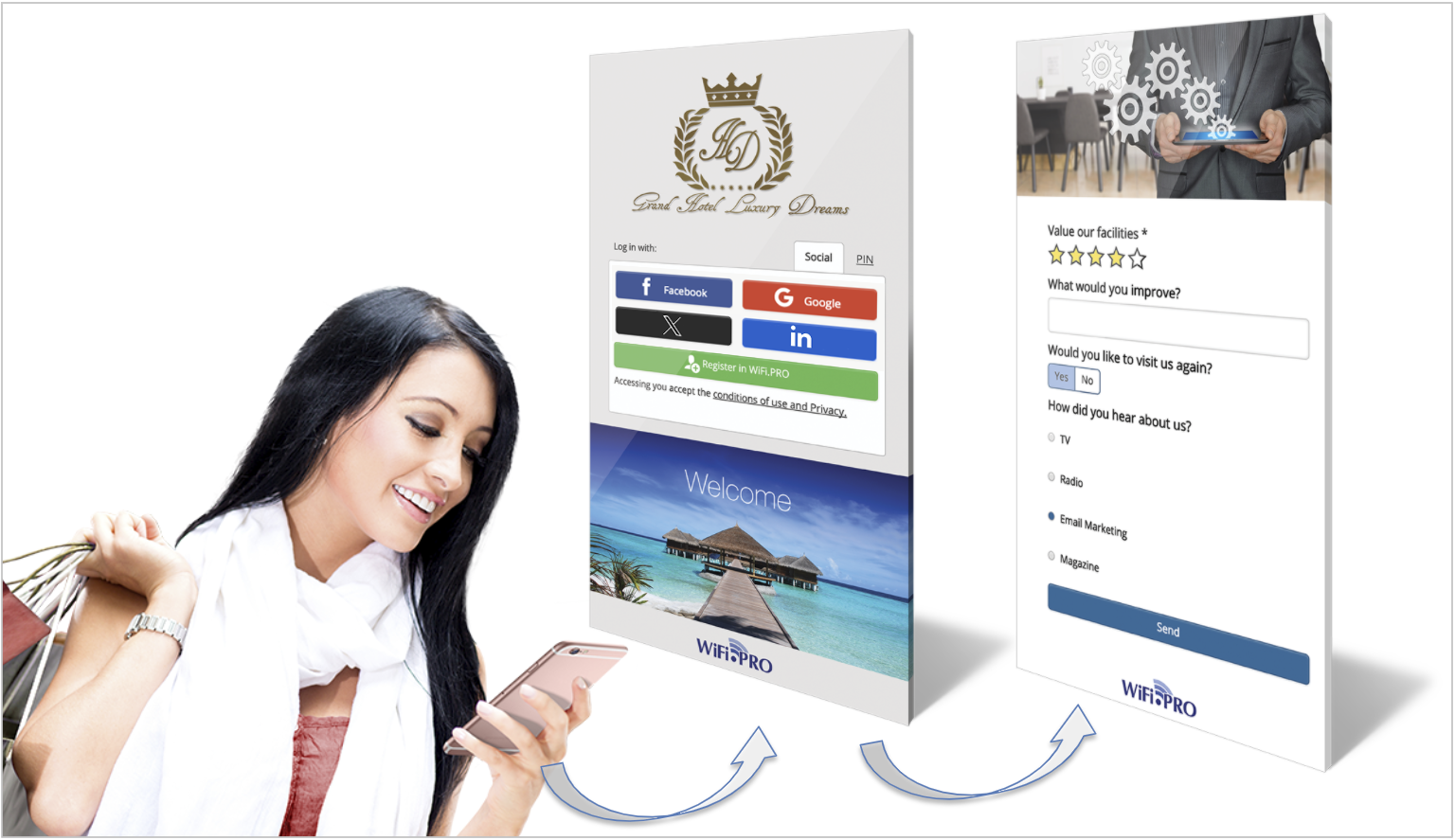 Captive Portal or WiFi login page.
Login
To connect to the WiFi service, the end user must authenticate. This is the «Login» and can be done in several ways. Depending on the specific needs of each site, Login can be performed via social media («Social Login»), by filling out a form or registration, by entering a PIN, or by providing an email account, among others.
WiFi Service
In the WiFi.PRO Platform, a «service» is defined as a set of parameters that create a tailored WiFi experience. This allows for limiting or designing the type of connection that end users of the open network will have. You can create as many WiFi services as needed, each configured differently. Subsequently, these services can be linked to different Login types. Example: A WiFi service with usage and consumption limits for all users logging in via Social Media, or a WiFi service without limits or expiration for all users connecting with a PIN previously provided by the establishment.
PIN
A PIN is a key provided to the end user to access the WiFi service. The Platform includes a «Create PINs» option. These keys are printed on «tickets» given to end users. The PIN consists of a string of alphanumeric characters that must be entered into the captive portal to access the WiFi when the Login type is set to «Login with PIN.»
Another PIN concept: To track all connections, the WiFi.PRO Platform automatically creates and assigns a PIN to every connecting user, regardless of the Login method used. You can consult the list of active PINs and active connections even if they were not performed through a PIN login.
WiFi.PRO Platform Users
From the WiFi.PRO Platform, all types of actions related to WiFi service management can be performed: renaming the network, designing captive portals, Marketing actions, creating and modifying services, defining WiFi usage privileges, limiting consumption and time, etc. These actions are performed by «Platform Users.»
User Profiles
User profiles can be created with restricted access to certain areas of the Platform. Each profile is defined with specific privileges, and its visibility of the Platform varies. Example: A Marketing profile user could only access tools intended for WiFi Marketing actions.
Environments
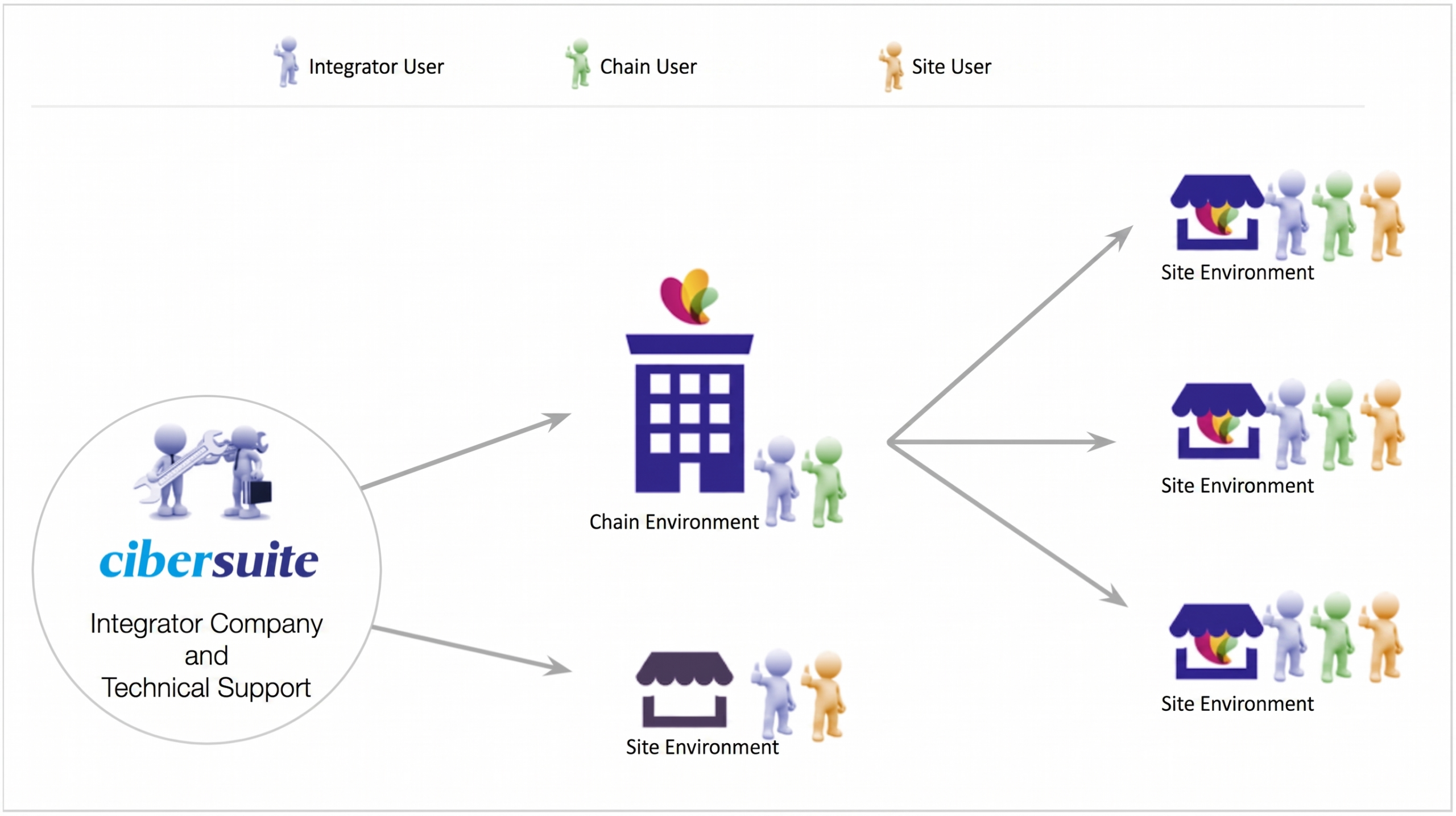
The Platform organizes sites by grouping them into a Chain environment or as an Independent Site. Platform users, depending on their profiles, can be:
-
INTEGRATOR User:
Users who access the platform to provide support services. -
CHAIN User:
Users who access the platform to manage a chain and all associated sites. They can access any site within the chain. -
SITE User:
This type of user only has access to the specific site assigned to them upon creation.