Saltar al contenido
Guide WiFi.PRO

Guide WiFi.PRO

WiFi.PRO Platform Guide

  • HOME
  • INTRODUCTION
  • QUICK START GUIDE
  • CORE CONCEPTS
  • THE WiFi.PRO PLATFORM
    • · Accessing the Dashboard
    • · Dashboard Areas
  • THE MANAGEMENT DASHBORAD
    • · Chain Environment
      • Site List
    • · Site Environment
    • · Options Menu
      • Users
      • Logs
      • Statistics
      • Tools
  • PIN: CREATE ACCES KEY
  • WiFi SERVICE MANAGEMENT
    • · Service Management – General
    • · Service Management – Limits
    • · Service Management – Data Request
  • CAPTIVE PORTAL MANAGEMENT
    • · Types of portals
    • · Login types
    • · Portal Creation
    • · WiFi Portal Design
      • Widgets
      • Plugins
      • Styles
      • Preview
    • · Form Portal Design
    • · Guide and Tips
  • STATISTICS AND BBDD
  • MARKETING TOOLS
    • · Images, banners, PopUps
    • · Smart filters
    • · Smart forms
    • · Data collection
    • · Social media
    • · Email marketing
    • · CRM Integrations
      • ReviewPro: Activation and Use Cases
  • SITE CONFIGURATION
    • · Site Data
    • · Default wifi service
    • · Captive Portal Design
    • · Legal terms and conditions
  • INTEGRATIONS
    • · Available Integrations
    • · How to activate an integration?
    • · POS Integration
  • LIST OF FEATURES
  •  F.A.Q.

Search
Generic filters

Captive Portal Management

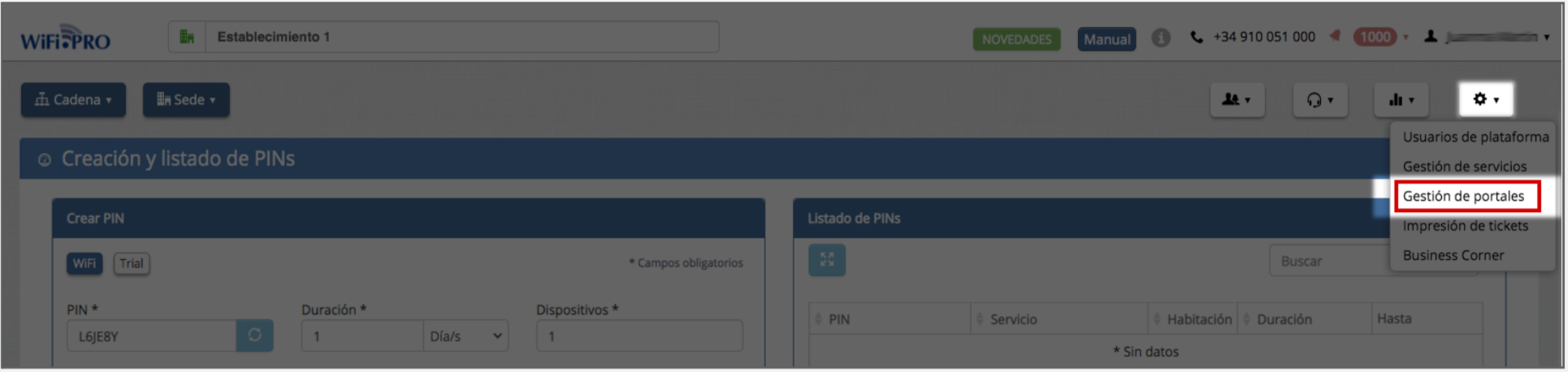
From the «TOOLS» menu you can access «Captive Portal Management.
Types of portals
WiFi Portal Design
Login types
Form Portal Design
Portal Creation
Guide and Tips

Login WiFi.PRO
