
Data is undoubtedly the key element when launching marketing or communication actions. After login, user data and information are recorded, though the specific details depend on the method used to access the service. Social Login, for instance, provides extensive information about users who have accepted the service conditions.
Sometimes, this data is not enough for the establishment, or the login type chosen for the captive portal simply does not provide relevant or direct user information. To «force» the collection of additional details, the portal can intelligently detect when a specific piece of data is missing and display a question requesting it.
This action is managed via the «Services» option within the «Tools» menu. 
The «Data Request» tab allows you to configure which end-user data points will be required (or not) during login. Each data field can be individually set as either optional or mandatory.
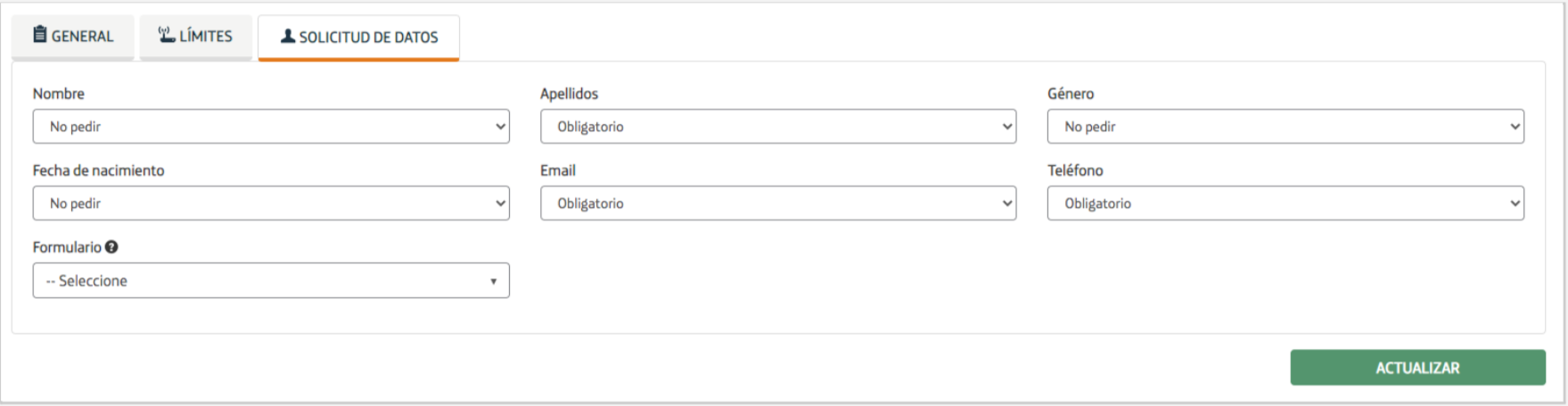 If this data cannot be obtained during login, you can activate the option to request it before the user connects to the WiFi.
Furthermore, you can link the service to a form-type portal (with customized questions). This way, a new page featuring the selected form will be displayed immediately after login.
If no specific form portal is selected, the one marked as «default» in the portals window will be shown. If no default form portal exists, this step will be skipped.