
The WiFi.PRO platform features a portal previewer that virtualizes a network connection. You can simulate various potential scenarios depending on each portal’s configuration and the configured services.
 Accessing a portal’s preview can be done from the portal list by using the button to the left of the portal name,
 or from the portal editor by selecting the option in the lower-left section of the editor’s toolbar.
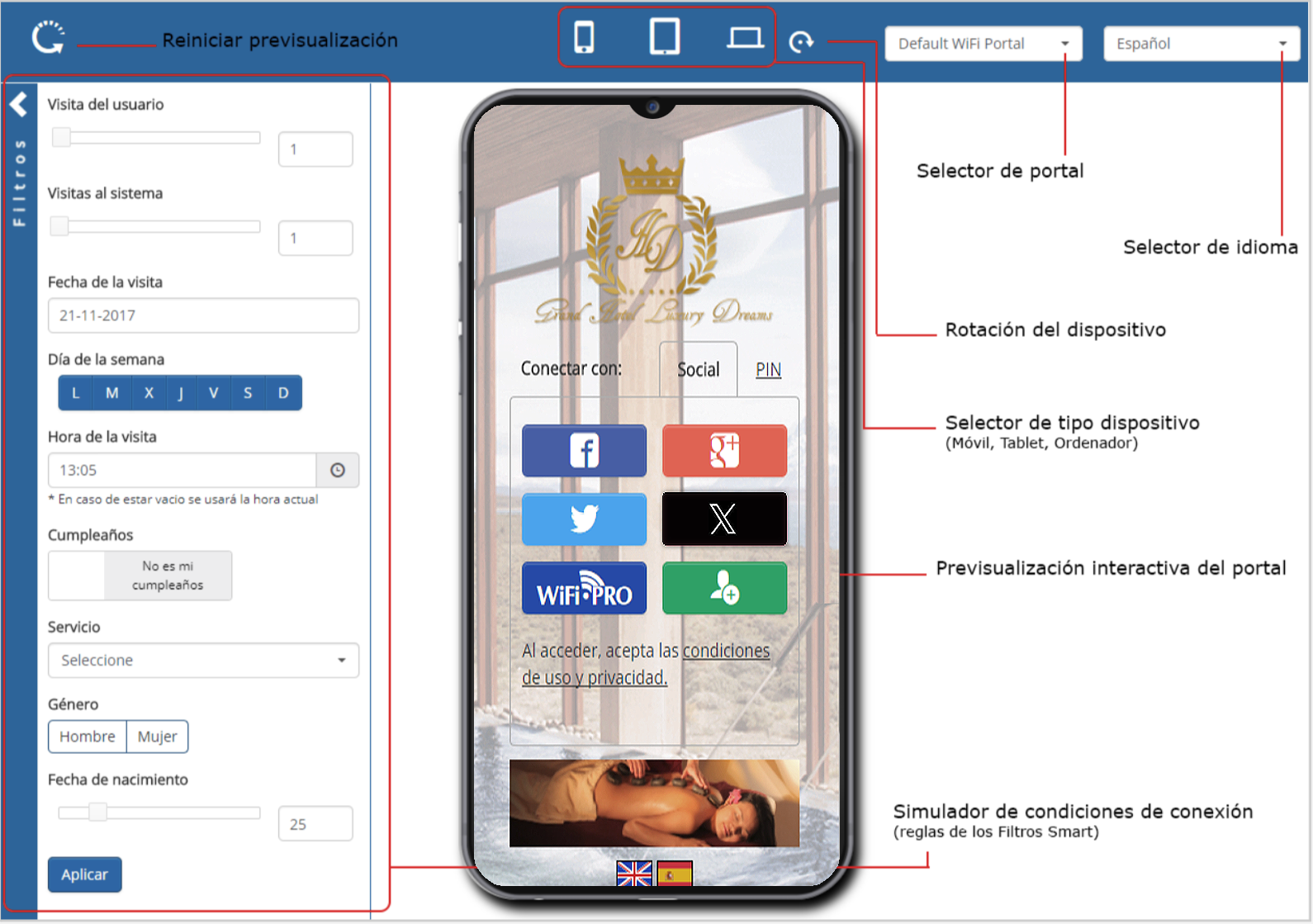 Captive Portal Preview Module
-
Reset
 Restarts the portal preview.
- Device type selector
 Allows you to choose between Smartphone, Tablet, or Computer.
- Device rotation
 Allows you to flip the orientation for Smartphone or Tablet devices.
Portal selector: Allows you to select which of the available portals to simulate.
- Language selector: Sets the language for the simulated portal.
- Filters Sidebar: Allows you to simulate specific connection conditions using Smart Filter parameters as well as the service type.
- Interactive Portal Preview: Simulates all the portal phases a user will encounter on the selected device type.