
From the «General» tab, you define the service name, duration, number of devices, or a URL to redirect to after login.
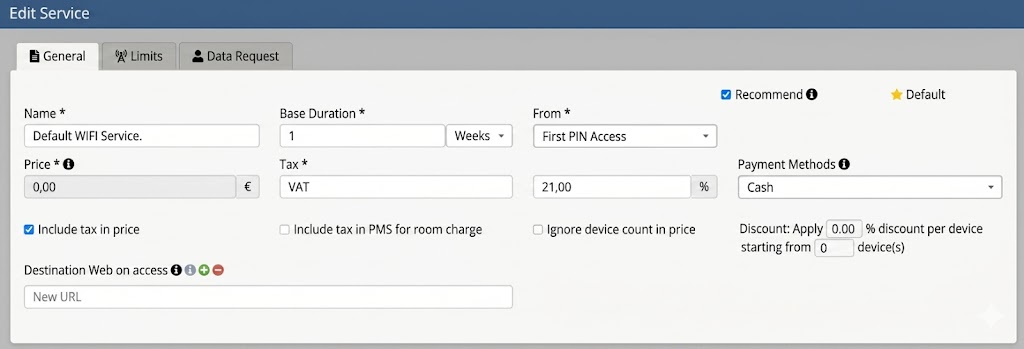
The «General» tab allows you to configure the basic parameters of the WiFi service.
Service Name
It is the primary identifier of the WiFi service within the platform.
When designing a captive portal, a login type (e.g., social media access, form, code, hotel PMS integration, etc.) is associated with a specific service. This allows different services to be linked to various login methods, ensuring that users accessing via different authentication methods have customized connection conditions, such as differentiated speeds, session times, or consumption limits.
Base Duration
Defines how long a user can stay connected before needing to reconnect through the captive portal. It can be configured in minutes, hours, or days according to company policy.
From
This field defines the activation moment of the service—the point at which the service becomes active. This can be from the moment of its creation (in cases where a PIN code is created manually) or from the moment the first access to the WiFi service is detected. By default, the «First PIN access» option is usually selected.
Base Devices
Determines the number of devices that can simultaneously use the same service. It should be noted that the average number of devices a user may use in a hotel establishment, conferences, etc., can be more than one.
Destination Web on Access
Allows you to choose the website the user will be directed to immediately after connecting to the WiFi. It can be used to display promotions, company information, or a welcome page. Additionally, up to four different URLs can be configured, and the system will randomly redirect the user to one of them.
Recommend Service
The access portal (captive portal) may have Login with PIN or key as a login option. By checking this box, this service will appear among the available options when creating a PIN or access key on the platform.
Default
Activates the service and sets it as the default for login types that are not based on forms or social media.
In this section, other parameters strictly linked to paid login types also appear, such as: Price, tax type and percentage, payment methods, etc.